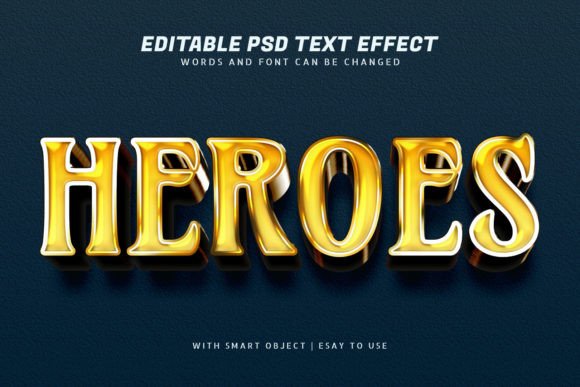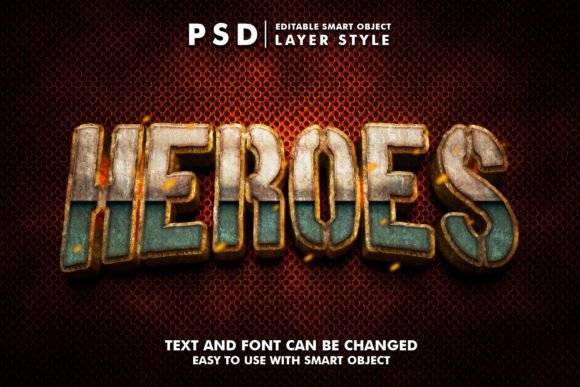
Heroes 3D Realistic Text Effect: A Powerful Tool for Creative Designers
In the world of digital design, creating visually striking text is essential for capturing attention and conveying messages effectively. One such resource that has gained popularity among designers is the Heroes 3D Realistic Text Effect. This graphic resource offers a quick and easy way to apply high-quality, realistic 3D text effects to your projects. Whether you're working on a website, social media cover, or promotional banner, this tool can elevate your design game significantly.
The Heroes 3D Realistic Text Effect is designed with user-friendliness in mind. It allows users to edit text effortlessly by simply double-clicking on a smart object named "Your Text." Once opened, you can replace the existing text with your own, save the changes, and see the updates reflected in the main file. This straightforward process ensures that even those with limited design experience can create professional-looking text effects without hassle.
Challenges and Goals in Text Design
Designers often face challenges when trying to make their text stand out. Traditional text styles can appear flat and uninteresting, especially in a competitive visual landscape. The goal is to create text that not only conveys the message but also captures the viewer's attention. This is where the Heroes 3D Realistic Text Effect comes into play, offering a solution that adds depth, dimension, and realism to any text.
For many, the need for a versatile and customizable text effect is crucial. Different projects require different styles, and having a resource that can adapt to various needs is invaluable. The Heroes 3D Realistic Text Effect meets this need by providing a range of options that can be tailored to suit specific design requirements. Whether you're looking for something bold and dramatic or subtle and elegant, this tool can help you achieve the desired outcome.
Practical Applications of Heroes 3D Realistic Text Effect
The versatility of the Heroes 3D Realistic Text Effect makes it suitable for a wide range of applications. From website elements and social media covers to promotional banners and movie titles, this effect can be used across multiple platforms. Its high-resolution format (2000x1333px at 300 dpi) ensures that the text looks sharp and clear, regardless of the medium it's displayed on.
One practical application is in the creation of social media covers for platforms like Facebook, YouTube, and Twitter. These covers often require eye-catching designs that reflect the brand or content of the page. By using the Heroes 3D Realistic Text Effect, you can add a dynamic element that draws viewers in and enhances the overall aesthetic of the cover.
Another use case is in banner promotions and flyers. These materials need to communicate information quickly and effectively. The 3D text effect can make headlines more engaging, helping to convey the message with greater impact. Additionally, the well-organized layers within the PSD file allow for easy customization, making it simple to adjust colors, fonts, and other design elements as needed.
Exploring Different Approaches
Users may approach the Heroes 3D Realistic Text Effect in different ways depending on their specific needs and skill levels. For instance, a professional designer might use it to enhance a logo or movie title, while a beginner might focus on creating a visually appealing greeting card or T-shirt design. The key is to understand how the effect can be adapted to fit the project's goals.
Some users may prefer to experiment with different color schemes and textures to achieve a unique look, while others may stick to the default settings for consistency. The Heroes 3D Realistic Text Effect supports both approaches, allowing for creative freedom while maintaining a high standard of quality.
Recommendations and Useful Considerations
If you're considering using the Heroes 3D Realistic Text Effect, there are a few recommendations to keep in mind. First, ensure that you have the necessary software, such as Adobe Photoshop, to open and edit the PSD file. Familiarizing yourself with the layer structure will also help you make the most of the editable features.
Additionally, consider the context in which the text will be used. For example, if you're designing for a website, make sure the text is legible and complements the overall design. If you're creating a social media cover, pay attention to the dimensions and resolution to ensure it looks great on all devices.
Finally, don't hesitate to explore the full potential of the Heroes 3D Realistic Text Effect. Experiment with different text styles, colors, and layouts to find what works best for your project. The more you experiment, the more you'll discover how this tool can enhance your creative output.
Conclusion
The Heroes 3D Realistic Text Effect is a valuable resource for anyone looking to add depth and realism to their text designs. Its ease of use, high-quality output, and versatility make it an excellent choice for a wide range of projects. Whether you're a seasoned designer or just starting out, this tool can help you achieve professional results with minimal effort.
By understanding the challenges and goals associated with text design, and exploring the practical applications of the Heroes 3D Realistic Text Effect, you can unlock new possibilities for your creative work. With the right approach and a bit of experimentation, this effect can become an essential part of your design toolkit.