Winter Bear 3D Shadow Box Papercut: A Unique Craft for Enthusiasts
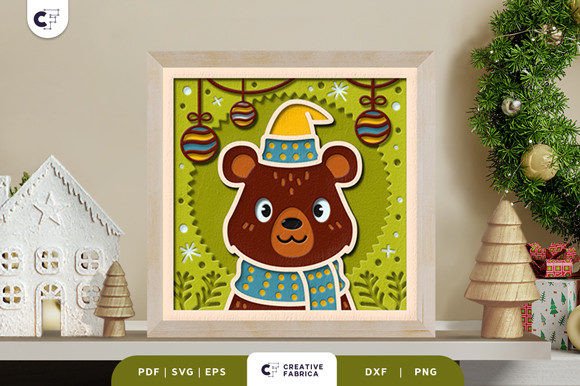
The Winter Bear 3D Shadow Box Papercut is a detailed, layered paper-cutting template that offers a creative way to bring winter-themed art to life. Designed as a square papercut, this project features nine distinct layers that, when assembled, create a striking three-dimensional effect. The design is ideal for crafters looking to add a touch of elegance and craftsmanship to their projects.
What Makes the Winter Bear 3D Shadow Box Papercut Unique?
Unlike traditional flat paper cuttings, the Winter Bear 3D Shadow Box Papercut uses multiple layers to produce depth and dimension. This approach allows for a more immersive visual experience, making it stand out from simpler paper-cut designs. The bear is intricately detailed, with elements such as fur texture, facial expressions, and natural surroundings that enhance its realism.
The design is available in several digital formats, including SVG, PDF, EPS, PNG, and DXF. This versatility makes it accessible for a wide range of users, whether they are using a Cricut or Silhouette machine or prefer manual cutting with an art knife or scissors. The inclusion of an SVG file also means that the design can be resized while maintaining its original aspect ratio, offering flexibility for different project sizes.
Comparison with Similar Options
When compared to other 3D shadow box templates, the Winter Bear design offers a balance of detail and practicality. Some alternatives may have fewer layers, which could simplify assembly but reduce the visual impact. Others might feature more complex layering, which could increase the difficulty for less experienced crafters.
For example, some papercut designs focus on minimalism, using only a few layers to achieve a clean look. While these can be easier to assemble, they may lack the depth and intricacy found in the Winter Bear template. On the other hand, highly detailed designs might require more advanced tools or techniques, which could be a barrier for beginners.
The Winter Bear 3D Shadow Box Papercut also stands out in terms of its adaptability. It can be used as a framed wall decoration or transformed into a light box by adding LED strips between the layers. This versatility makes it suitable for both static displays and interactive, illuminated projects.
Strengths and Tradeoffs
One of the key strengths of the Winter Bear 3D Shadow Box Papercut is its accessibility. The availability of multiple file formats ensures that users with different tools and skill levels can work with the design. Whether you're using a cutting machine or crafting by hand, the template provides a clear structure for assembly.
However, there are tradeoffs to consider. The need for glue or double-sided tape to assemble the layers adds an extra step to the process. For those who prefer one-step projects, this might be a drawback. Additionally, the size of the design—20.32 x 20.32 cm—may not suit all framing or display needs, though it can be adjusted if necessary.
The use of specific cardstock, such as Encore Cardstock 80 lb cover, is another consideration. While the product recommends this material, users may choose alternative papers based on availability or personal preference. However, the quality of the cardstock can affect the final appearance, so careful selection is important.
Best-Fit Situations and Limitations
The Winter Bear 3D Shadow Box Papercut is ideal for crafters who enjoy working with layered designs and are looking for a project that offers both challenge and reward. It’s particularly well-suited for holiday decorations, gift-making, or as a focal point in a themed room. Its intricate details make it a great choice for those who want to showcase their craftsmanship.
However, it may not be the best option for those seeking quick or simple projects. The assembly process requires time and patience, especially for those new to 3D papercutting. Additionally, the design’s size and complexity may not align with all creative visions, particularly for those looking for smaller or more abstract pieces.
Another limitation is the reliance on specific tools for cutting. While manual methods are possible, using a cutting machine can significantly streamline the process. Readers without access to such tools may find the project more labor-intensive.
When to Choose the Winter Bear 3D Shadow Box Papercut
The Winter Bear 3D Shadow Box Papercut is a strong choice for crafters who value detail, depth, and customization. If you’re looking for a project that can be adapted for different purposes—such as a wall hanging or a light box—this design offers a flexible foundation. It’s also a good fit for those who want to create a meaningful, handmade gift.
For example, if you’re planning a winter-themed event or looking for a unique way to celebrate the season, this papercut could serve as a centerpiece. Its ability to be customized with lighting or framing options makes it adaptable to various settings and preferences.
Alternatives and Considerations
If the Winter Bear 3D Shadow Box Papercut doesn’t meet your needs, there are other options to explore. Some crafters may prefer simpler 2D paper cuts that require fewer materials and less time to complete. Others might look for templates with different themes, such as animals, nature scenes, or seasonal motifs.
For those interested in similar 3D designs, comparing features like layer count, file formats, and ease of assembly can help identify the best fit. It’s also worth considering the availability of materials, such as cardstock and adhesives, as these can influence the overall experience.
In summary, the Winter Bear 3D Shadow Box Papercut offers a unique blend of creativity, detail, and versatility. Whether you're a seasoned crafter or just starting out, it presents an opportunity to engage with a meaningful and visually striking project. By understanding its strengths, limitations, and potential applications, you can determine if it aligns with your creative goals.